
Approve, answer and steer Claude Code from your wrist.
PeakWatch turns a Wear OS watch into a thin client for your Claude Code sessions. A small relay on your own machine owns the sessions through the Claude Agent SDK; the watch lists them ranked by what needs you, approves or denies tool permissions before a countdown runs out, takes prompts by voice and reads replies back. WiFi or LTE, phone optional, with a dashboard for the relay on the desktop.
Founder's Pass: free for the whole beta and the first year after it. 500 places, closing 15 November 2026.
Your coding agent, on your wrist.
Claude Code sessions on your Galaxy Watch or another Wear OS watch. See which agent needs you, approve a tool with its arguments in front of you, dictate the next prompt and read the reply, with no phone or laptop open.
- 1
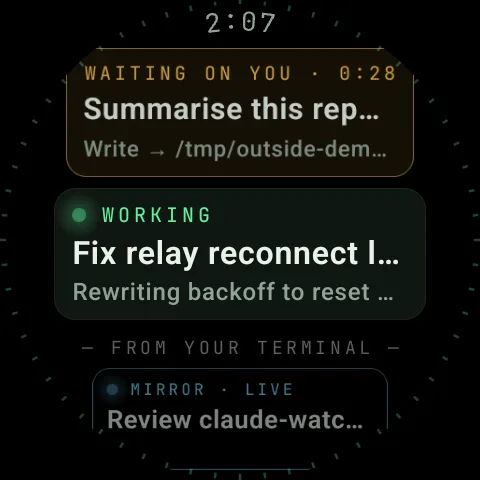
- tap to unblock an agent A blocked session goes to the top of the list and is the only thing on screen shown in amber. Tap it, read the arguments, approve or deny, and the agent is moving again.
- 60 s
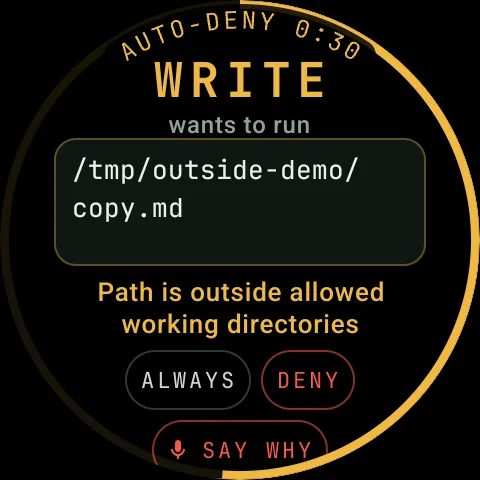
- then it denies itself Every permission request carries a countdown drawn on the bezel. Ignore it and the relay denies the request for you, so nothing runs just because you were away from the watch.
- 0
- phones in the loop The watch talks directly to your relay over WiFi or LTE. The phone can stay in the bag and the laptop can stay shut; the sessions keep running on your machine.
What ships in the beta
Everything below is either built or being built. Waitlist members get each piece as it ships.
- [01]
Ranked by what needs you
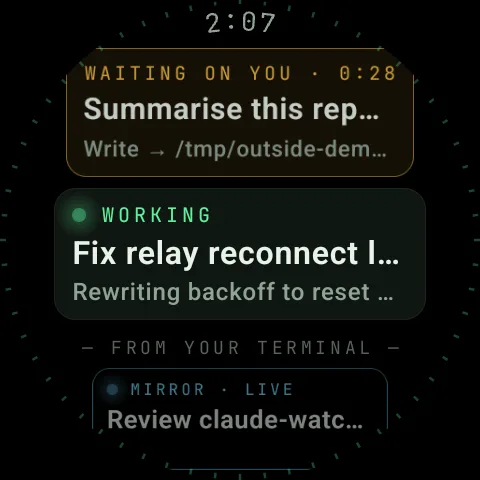
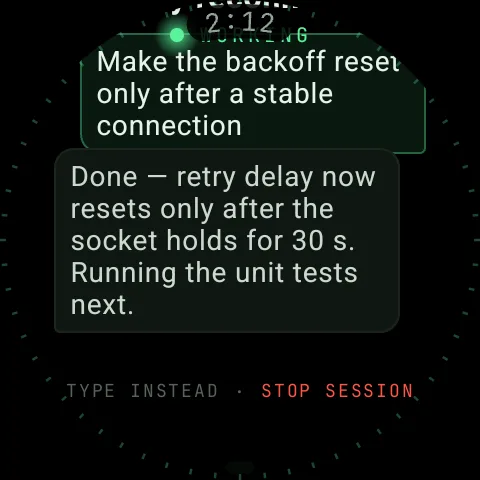
Nine status labels, from YOUR TURN and WAITING ON YOU (with a live countdown) to WORKING and MIRROR · IDLE. Blocked sessions go to the top of the list, newest first.
- [02]
Approve with the arguments in front of you
"Approve Write?" on its own is impossible to answer; with the file path in front of you it is easy. Every request shows the tool, its arguments and the SDK's own reason, plus Always, Deny and Say why.
- [03]
Speak or type
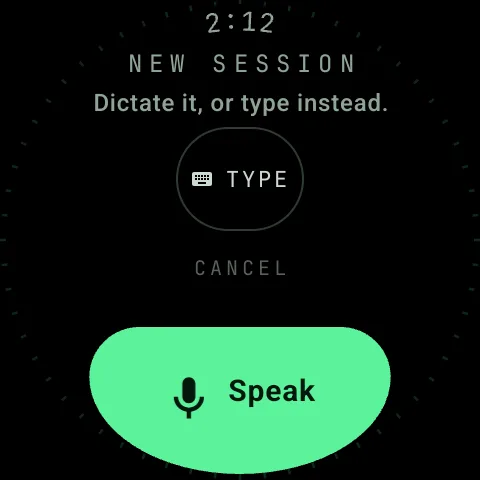
Dictate the next prompt with the mic, or use the mini keyboard when it is a path or a token. Each assistant turn streams to the wrist as it completes.
- [04]
Six quick replies
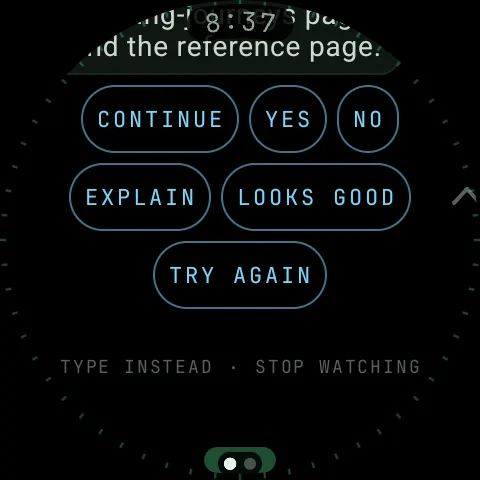
continue, yes, no, explain, looks good, try again, pinned under every conversation and coloured by what a tap will do: reply, resume or take over.
- [05]
Summarise a session
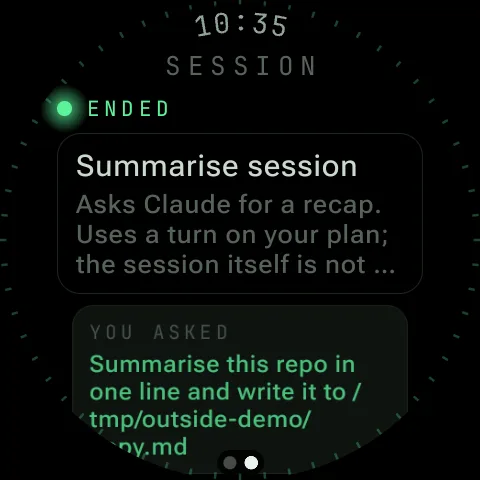
A separate query over the transcript, with no tools enabled, answers "what happened?" on one screen. It works on mirrored and ended sessions without changing them.
- [06]
Mirror the terminal
The relay tails every Claude Code transcript on disk, so sessions you started at a keyboard show up too, marked violet. Reply from the watch and it takes the session over.
- [07]
Your plan, at a glance
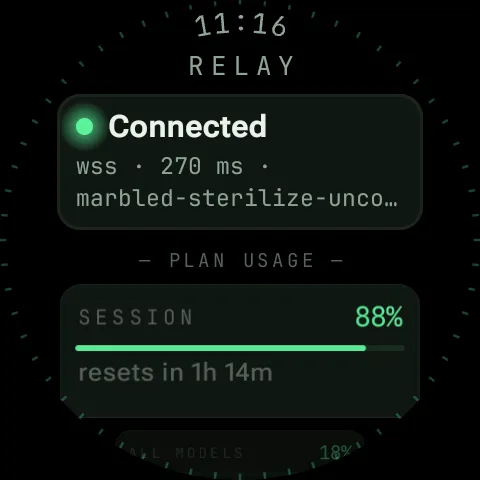
Session and weekly limits with reset times, on the session page and under Connected in Settings, so you know where you stand before you use up the last hour.
- [08]
Paired to your relay, and only yours
A bearer token is generated on first run and typed in once. The socket carries it as a subprotocol so it never appears in a proxy log, and ten wrong tokens in a minute gets a 429.
A look inside PeakWatch
Eight screens, all on the round face.
The only native Wear OS app.
Other remotes for coding agents live on the phone. PeakWatch runs on the watch itself, and it sees sessions you started at the keyboard.
| Feature | PeakWatch | Claude Remote Control | Happy Coder | Omnara |
|---|---|---|---|---|
| Native Wear OS app | Yes | No | No | No |
| Approve tool calls remotely | Yes | Yes | Yes | Yes |
| Mirrors sessions started in any terminal | Yes | With auto-connect on | Via its wrapper | Via its wrapper |
| Plan-usage meter | Yes | /usage command | No | No |
| Voice prompts | Yes | Yes | Yes | Yes |
| One-tap session summary | Yes | /recap command | No | No |
| iPhone app | No | Yes | Yes | Yes |
Checked against each product’s public pages and store listings in October 2026. Products change; if a cell is out of date, tell us at hello@upeak.io and we will fix it.
PeakWatch, answered
Does it need a phone?
Where do my sessions and code run?
What happens if I miss an approval?
Can it see sessions I started in a terminal?
Which watches are supported?
Which agents does it work with?
What is the Founder's Pass?
What happens when the founding round closes?
The other apps
 PeakUBody · A coach that reads everything you already track.
 PeakVitalBaseline · Three tests. One number. Your real age.
 PeakBeatTraining · Your effort writes the setlist.
 PeakClothesWardrobe · One outfit a morning. No scrolling.
 PeakLookAttention · Drafts the reply. Keeps the follow-up going.
 PeakVoucherWallet · A wallet for the vouchers buried in your messages.
 PeakFinanceHousehold · Save more, and see exactly where the household stands.
The research behind PeakWatch
Claude Code vs Codex CLI vs Antigravity: which coding agent to use
Claude Code vs Codex CLI vs Google Antigravity: price, where each runs, how each asks permission, and which you can…
Best Claude Code plugins, skills and GitHub repos (October 2026)
The best Claude Code plugins, skills and GitHub repos: Superpowers, ECC, Graphify, Remotion and the official…
Claude Code Remote Control: run it from your phone and watch
Claude Code Remote Control: how to set it up step by step, which plans it needs, what it does and does not do, the…
Get in while
it is still free.
The suite opens one app at a time, and the first 500 people through the door open it as founders. Tell us which app you want first and that is where we will start you.
Free for the whole beta — and the first year after launch.
Join before 15 November 2026 and you join as a founder. After it closes the waitlist stays open, but a waitlist is all it is: no free year, no locked price, and invites go out behind the founders.
- Every app you tick, free for the whole beta and for the first year after it launches.
- Founder pricing after that year, locked for as long as you stay.
- First in the queue: founders are invited ahead of the general waitlist, in join order.
- A direct line to the people building it — your reply goes to us, not to a helpdesk.
Your founder place is held.
We got it. Your Founder's Pass is logged against your email. When your slot opens you'll get one email with the build for the app you asked for first.